 ASP.NET MVC 4 -
Criando uma Web API com suporte a operações CRUD - II
ASP.NET MVC 4 -
Criando uma Web API com suporte a operações CRUD - II
ASP.NET MVC 4 -
Criando uma Web API com suporte a operações CRUD - II
Baseado no artigo: http://www.asp.net/web-api/overview/creating-web-apis/creating-a-web-api-that-supports-crud-operations
Na primeira parte deste artigo criamos a Web API com o suporte as operações CRUD e continuando vamos criar a interface na aplicação MVC usando Javascript e jQuery para usar o serviço criado.
Portanto Abra o projeto ProdutosRepositorio criado no artigo anterior no Visual Web Developer 2010 Express Edition ou Visual Studio 2010.
Usando Web API com JavaScript e jQuery
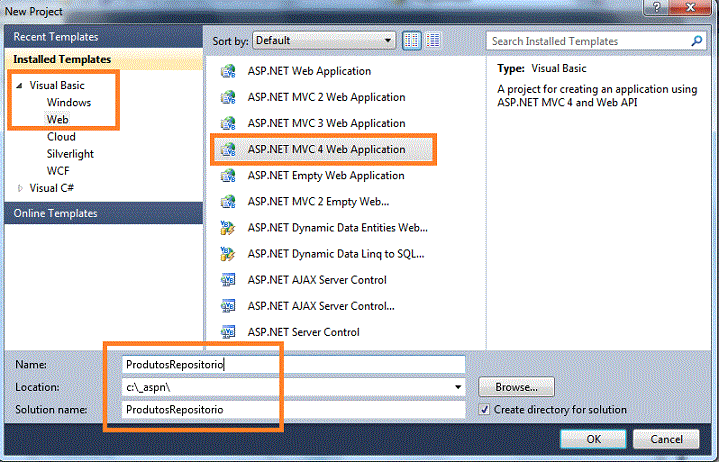
Na janela Solution Explorer, expanda a pasta Views e a seguir expanda a pasta Home. Você deverá ver um arquivo chamado Index.vbhtml. Clique duas vezes nesse arquivo para abri-lo no editor conforme abaixo:
 |
O arquivo Index.vbhtml processa o HTML utilizando o mecanismo de exibição Razor. No entanto, não vamos usar todos os recursos Razor neste tutorial, quero mostrar apenas como um cliente pode acessar o serviço usando HTML simples e Javascript. Portanto, remova o código do arquivo substituindo-o pelo código abaixo:
@section scripts
{
    <style type="text/css">
        table
        {
            border: 1px solid #000;
            border-collapse: collapse;
            color: #666666;
            min-width: 200px;
        }
        tr
        {
            border: 1px solid #000;
            line-height: 25px;
        }
        th
        {
            background-color: #B1C3CC;
            color: #000;
            font-size: 13px;
            text-align: left;
        }
        th, td
        {
            padding-left: 5px;
        }
    </style>
    <script src="@Url.Content("~/Scripts/jquery-1.6.2.js")" type="text/javascript"></script>
    <script src="@Url.Content("~/Scripts/knockout-2.0.0.debug.js")" type="text/javascript"></script>
    <script type="text/javascript">
        function limpaStatus() {
            $('#status').html('');
        }
        var detailModel = function () {
            this.Nome = ko.observable();
            this.Categoria = ko.observable();
            this.Preco = ko.observable();
        }
        var API_URL = "api/produtos/";
        var viewModel = new detailModel();
        function add() {
            limpaStatus();
            var produto = ko.toJS(viewModel);
            var json = JSON.stringify(produto);
            $.ajax({
                url: API_URL,
                cache: false,
                type: 'POST',
                contentType: 'application/json; charset=utf-8',
                data: json,
                statusCode: {
                    201 /*Created*/: function (data) {
                        self.produtos.push(data);
                    }
                }
            });
        }

        function find() {
limpaStatus(); var id = $('#produtoId').val();
            $.getJSON(API_URL + id,
            function (data) {
                viewModel.Nome(data.Nome);
                viewModel.Categoria(data.Categoria);
                viewModel.Preco(data.Preco);
            })
        .fail(
            function (xhr, textStatus, err) {
                $('#status').html('Erro : ' + err);
            });
        }
        function update() {
            limpaStatus();
var id = $('#produtoId').val();
            var produto = ko.toJS(viewModel);
            var json = JSON.stringify(produto);
            $.ajax({
                url: API_URL + id,
                cache: false,
                type: 'PUT',
                contentType: 'application/json; charset=utf-8',
                data: json,
                success: function () { $.getJSON(API_URL, self.produtos.update); }
            })
            .fail(
            function (xhr, textStatus, err) {
                $('#status').html('Erro : ' + err);
            });
        }
        function deleta() {
            limpaStatus();
var id = $('#produtoId').val();
            var produto = ko.toJS(viewModel);
            var json = JSON.stringify(produto);
            $.ajax({
                url: API_URL + id,
                cache: false,
                type: 'DELETE',
                contentType: 'application/json; charset=utf-8',
                data: json,
                success: function () { $.getJSON(API_URL, self.produtos.remove); }
            })
            .fail(
            function (xhr, textStatus, err) {
                $('#status').html('Erro : ' + err);
            });
        }
$(document).ready(function () {
            self.produtos = ko.observableArray();
            self.produtos.update = function (data) {
                var c = self.produtos;
                c.removeAll();
                c.push.apply(c, data);
                // Sort by ID
                c.sort(
                        function (left, right) { return left.Id - right.Id }
                        );
            };

            ko.applyBindings(self.produtos, document.getElementById('produtos'));
            ko.applyBindings(viewModel, document.getElementById('detail'));
$.getJSON(API_URL, self.produtos.update); });
</script>
end section
<div id="body">
    <section class="content-wrapper main-content">
        <h3>Produtos</h3>
        <table id="produtos">
        <thead>
            <tr><th>ID</th><th>Nome</th><th>Categoria</th><th>Preço</th></tr>
        </thead>
        <tbody data-bind="foreach: produtos">
            <tr>
                <td data-bind="text: Id"></td>
                <td data-bind="text: Nome"></td>
                <td data-bind="text: Categoria"></td>
                <td data-bind="text: Preco"></td>
            </tr>
        </tbody>
        </table>
    </section>
    <section id="detail" class="content-wrapper">
        <h3>Ver Produto</h3>
        <div>
        <label for="produtoId">ID</label>
        <input type="text" title="ID" id="produtoId" size="5"/>
        <input type="button" value="Procurar" onclick="find();" />
        </div>
        <div>
        <label for="nome">Nome</label>
        <input data-bind="value: Nome" type="text" title="Nome" id="nome" />
        </div>
        <div>
        <label for="categoria">Categoria</label>
        <input data-bind="value: Categoria" type="text" title="Categoria" id="categoria" />
        </div>
        <div>
        <label for="preco">Preco</label>
        <input data-bind="value: Preco" type="text" title="Preco" id="preco" />
        </div>
        <div>
        <input type="button" value="Atualizar" onclick="update();" />
        <input type="button" value="Incluir" onclick="add();" />
        <input type="button" value="Deletar" onclick="deleta();" />
        </div>
        <div>
        <p id="status"></p>
        </div>
</section> </div> |
No código do arquivo index.vbhtml temos as seguintes definições:
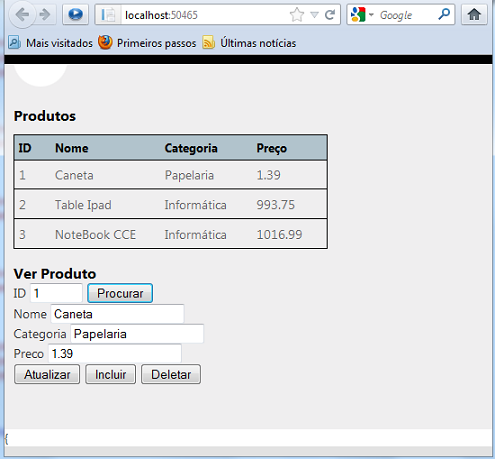
Executando o projeto iremos obter:
 |
Pegue o projeto completo aqui:
 ProdutosRepositorio2.zip (sem a pasta
packages: Você deverá criar o projeto e substituir os arquivos principais)
ProdutosRepositorio2.zip (sem a pasta
packages: Você deverá criar o projeto e substituir os arquivos principais)
Col 1:12
dando graças ao Pai que vos fez idôneos para participar da herança dos santos na luz,Referências:
http://www.asp.net/web-api/overview/getting-started-with-aspnet-web-api/tutorial-your-first-web-api